
How to Make a Public Profile on Snapchat in 2026
Want more people to see your content on Snapchat? A Public Profile lets eligible users share content beyond their friends, build followers, and reach a wider audience on the app.
In 2026, eligible Snapchatters may already have a Public Profile on their account. However, Snapchat also allows you to create additional Public Profiles if you want to manage more than one public presence.
So, how do you find your existing Public Profile or create another one? This guide walks you through the latest steps, eligibility requirements, profile setup, and what to do if “Public Profile” doesn’t appear.
What Is a Snapchat Public Profile?
It is a public-facing part of your Snapchat account that allows people beyond your friends to see content you choose to share publicly.
Unlike a regular personal profile, which is mainly focused on connecting with friends and seeing your ranking with your closest friends, a Public Profile gives you a way to share Stories, Lenses, and other content with a wider Snapchat audience.
Which Type of Public Profile Do You Have?
Snapchat currently offers three types of Public Profiles. The right type depends on how you use Snapchat and what you want to achieve with your profile.
Note: Professional Accounts are currently limited to Snapchatters 18 and older, and the feature is still being rolled out, so it may not be available to everyone.
Got a Public Profile You Never Created? Here’s Why
You may already have a Public Profile even if you never manually created one. Snapchat says that in most countries, Snapchatters who are 16 or older can have a Public Profile available on their account by default. Using it is optional, so you can choose whether to add public content or customize the profile.
Your Public Profile can include information such as a profile photo, cover photo, and bio, while public content can be shared with people beyond your friends.
How to Find Your Public Profile
How to Create an Additional Public Profile
Snapchat allows you to create more than one Public Profile even if you already have a standard one. Here’s how:
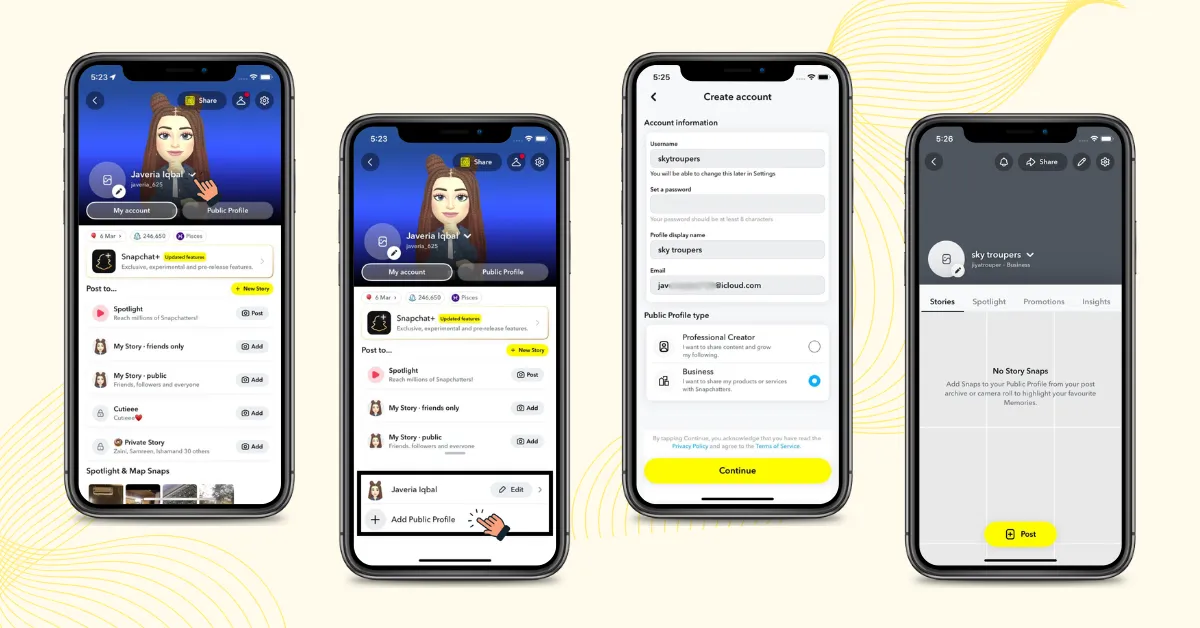
Note: Access to multiple Public Profiles depends on your account and Snapchat’s eligibility requirements, so this feature may not be available to everyone.
How to Manage Multiple Public Profiles
You can easily manage multiple Public Profiles from the same Snapchat account, making it easier to keep different types of public content or audiences separate.
Note: Each Public Profile has its own followers, so audiences and follower counts cannot be combined or moved between profiles.
Why Is the Public Profile Option Missing?
You may not see the Public Profile option if:
If you’re 16 or 17, Snapchat provides additional privacy and safety protections for public posting. Some public features also work differently for users under 18.
What Should You Add or Edit to Your Public Profile?
A Public Profile is more useful when visitors can quickly understand who you are and what you post.
You can edit these details anytime by opening your Public Profile and tapping the pencil (Edit) icon in the top-right corner.
How to Grow Your Public Profile
Creating is the first step. If you want to build an audience, focus on creating content that gives people a reason to follow you.
Post Consistently
Share content regularly to keep your audience engaged and give them a reason to come back.
Create Original Content
Post your own ideas, experiences, and creative content instead of relying on copied or repetitive posts.
Use Spotlight
Share your best short-form videos on Spotlight to reach people beyond your existing friends list.
Save Your Stories
Keep your strongest Stories on your Public Profile so new visitors can see more of your content.
Track Your Analytics
Check your insights to see which content gets the most views and engagement, then use those results to improve future posts.
FAQs
Conclusion:
Creating a Public Profile on Snapchat is easier than you might think, and you may already have one available on your account. In this guide, we covered how to find your existing Public Profile, create an additional profile, manage multiple profiles, and check why the Public Profile option may be missing.
We also explained the different Public Profile types, eligibility requirements, profile customization options, and practical ways to grow your audience.