
What Does the Green Dot Mean on Snapchat? The Real Meaning Explained
If you use Snapchat regularly, you may have noticed a little green dot appearing next to some profiles. It’s a simple icon, but it often leaves many users wondering what it means and why it appears for certain Bitmoji.
Does it mean someone is online right now? Is it a sign they were recently active? And why does it appear in some places on Snapchat but not everywhere in the app? These are common questions many users ask.
In this guide, we’ll explain what the green dot means on Snapchat, how accurate it is, where you can see it, and how to manage it for better privacy. By the end, you’ll understand exactly how this feature works.
What Is the Green Dot on Snapchat and What Does It Mean?
It is an activity indicator that suggests a person has been active on the app recently. This feature helps users discover and connect with active Snapchat accounts.
It has a different meaning from Instagram, WhatsApp, and Messenger, where it often shows that someone is online right now. On Snapchat, the green dot usually indicates recent activity rather than live online status.
Snapchat has not shared an official time limit for how long it remains visible. In most cases, it simply means the user was active recently, often within the last 24 hours, but the exact timing can vary.
Where Does the Green Dot Appear?
This symbol appears in specific discovery areas of the Snapchat app where users find new friends and grow their network. You’ll notice it in the following sections:
New Friend Suggestions
In Snapchat, it may appear next to recommended profiles you might know.
Add Friends Page
While browsing or adding new friends, you may notice it on certain profiles.
Quick Add Section
In the Quick Add area, it may display suggested accounts to highlight active users, increasing the chances of getting a response.
Search Results
When you search for a username, it may appear next to specific profiles, helping you identify users who are more likely to respond.
Profile Section
When you open a user’s profile, you may see the green dot near their Bitmoji, whether they are your best friends or someone you recently discovered.
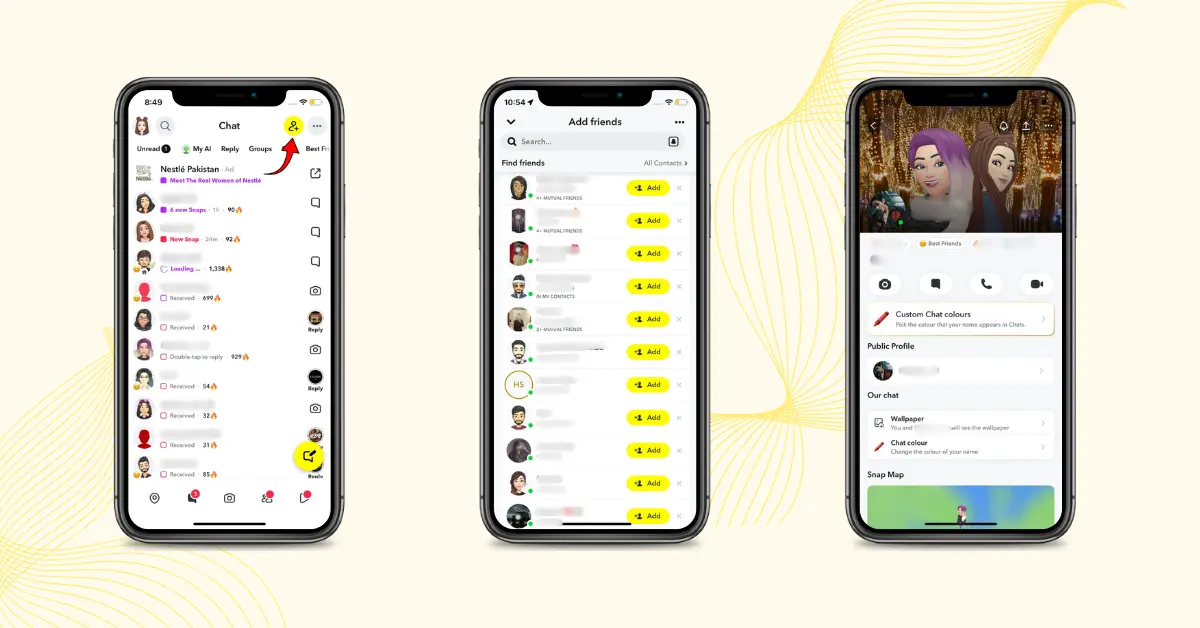
Note: If you don’t see the green dot on certain Snapchat profiles, it usually means the user has turned off their Activity Indicator in privacy settings. Usually, this symbol does not appear in the Chat screen or Stories section.
How to disable the Activity Indicator
It’s quite simple to turn off your activity indicator by following these steps:
After turning it off, others won’t see your recent activity on the Add Friends screen. However, you can still see other users’ green dot if they have the activity indicator enabled.
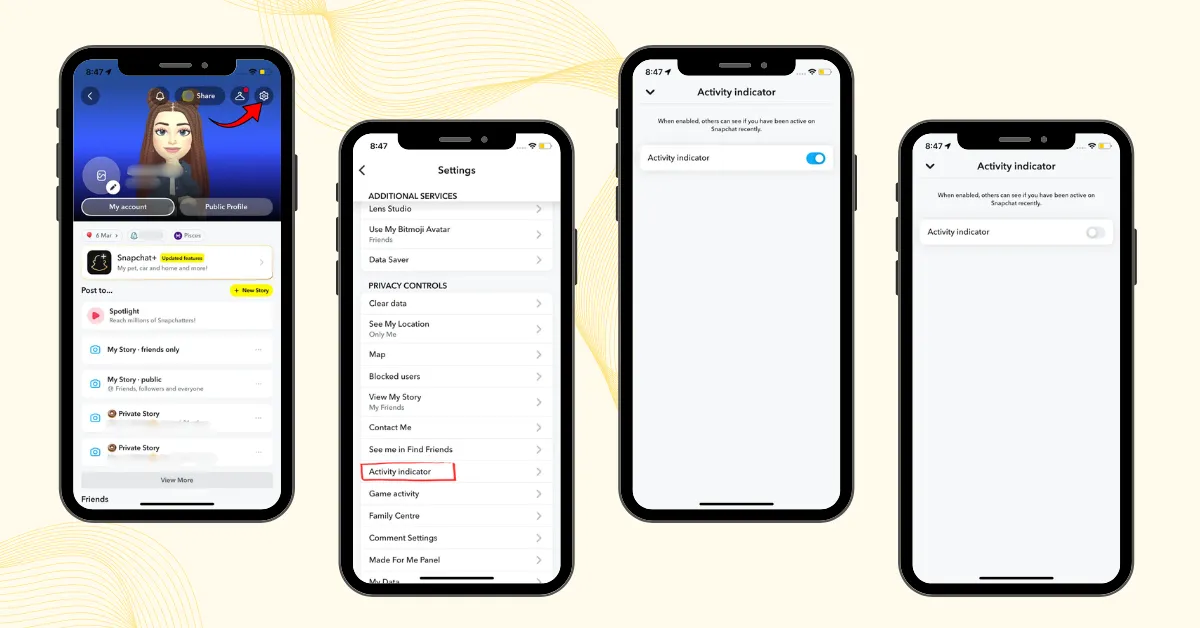
Note: If you cannot find the option, make sure your Snapchat app is up to date, as settings may vary by device or region.
Is the Green Dot Always Accurate?
It is moderately accurate, but not perfect. It is designed as a recent activity indicator, not a live online status tracker. It can help you know if someone uses Snapchat often, but it does not guarantee they are online at that moment.
Can You Monitor Someone’s Activity with the Snapchat Green Dot?
Instead of relying only on the green dot, combine it with other Snapchat signals, such as:
Monitoring these interactions can also help you understand your friendship ranking system on Snapchat to see how close someone is within your Best Friends list. These indicators often give a clearer picture of actual activity status.
Snapchat Last Seen: Is Your Privacy at Risk?
Snapchat doesn’t offer a traditional “last seen” feature like other social media platforms. However, if a user has Snap Map location enabled, their last active time may still be visible in chat screens through their location updates. To enhance your privacy, you can enable Ghost Mode in Snap Map settings, which completely hides your location so no one can track your movements.
Pros and Cons of Snapchat Green Dot
| Pros | Cons |
|---|---|
| ✅ Helps You Find Active Users | ❌ Not Always Accurate |
| ✅ May Increase Chances of Faster Replies | ❌ Can Create Privacy Concerns |
| ✅ Useful on Add Friends Screen | ❌ May Cause Misunderstandings |
| ✅ Improves Social Interaction | ❌ Does Not Appear Everywhere in the App |