
How to Half Swipe on Snapchat Without Opening Messages
Have you ever opened a Snapchat message by mistake and instantly regretted it because the sender could see the chat marked as “Opened” when they checked the conversation? Not every chat deserves an immediate response, and sometimes you may want to check a message before deciding how to reply.
In this guide, you’ll learn how to half swipe on Snapchat to view unread messages on both Android and iOS devices, how the trick works, common mistakes to avoid, and everything you need to know about this Snapchat gesture.
What Is Half Swiping on Snapchat?
Half Swiping on Snapchat is an unofficial gesture that allows users to check unread text messages without fully opening the conversation.
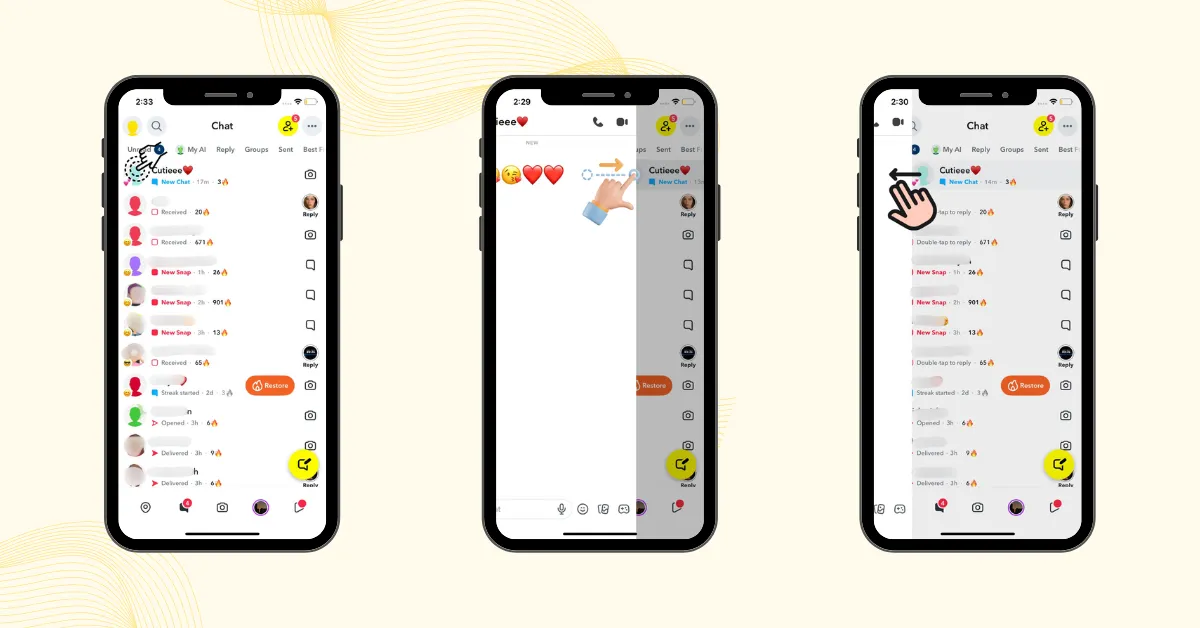
Instead of tapping a friend’s chat, you place your finger on their Bitmoji or profile icon in the Chat list and partially swipe to the right. When performed correctly, you can view a message preview while the chat status does not change to “Opened.”
Note: If you take a screenshot while half-swiping a chat, the sender will receive a screenshot notification.
Quick facts about Half Swipe
Why Use Half Swipe on Snapchat?
It gives you more flexibility when managing conversations. The main purpose of Half Swipe is to give users more control over their conversations.
Think Before You Respond
Opening an important message at the wrong time can create pressure to answer immediately. Half Swipe gives you time to understand the message and prepare the right response.
Avoid Unnecessary Conversations
Some messages may not need an immediate reply. Checking the message first helps you decide whether it requires your attention.
Manage Messages When You’re Busy
If you receive a Snapchat message at a bad time, Half Swipe allows you to quickly check the context and respond when you have time.
Note: Half Swipe also works in Snapchat group chats, allowing you to preview messages the same way as individual conversations.
How to Half Swipe on Snapchat?
Follow these steps carefully because a small mistake can open the conversation.
Open the Chat Tab
Open Snapchat and tap the Chat tab in the bottom navigation bar to see your list of conversations.
Select the Friend (Without Tapping)
Locate the friend whose message you want to check. Do not tap the conversation, as tapping will fully open the chat and notify the sender.
Swipe the Profile or Bitmoji Slightly
Place your finger on the friend’s profile picture or bitmoji and swipe slightly to the right while keeping your finger on the screen.
Note: Swipe gently and slowly. Fully swiping the screen will open the chat and cause the half‑swipe trick to fail.
Hold Your Finger in Place
This step is crucial. Do not lift your finger at any point while reading the message. Lifting your finger can instantly open the chat and break the half swipe trick.
Swipe Back to Exit Safely
Once you’re done reading, gently swipe back to the left and release your finger only after returning to the normal chat screen.
Half Swipe Limitations
It is mainly designed for checking text conversations. It can help you preview chat messages, but it is not a way to access every type of Snapchat content without opening it normally.
| Content Type | Half Swipe Support |
|---|---|
| Text messages | ✅ Yes |
| Emojis and chat text | ✅ Yes |
| Photo Snaps | ❌ No |
| Video Snaps | ❌ No |
| Voice Messages | ❌ No |
| Long Text Messages | ⚠️ May only show partially |
Does Half Swipe Still Work in 2026?
Yes, Half Swipe still works on Snapchat in 2026 when performed correctly. However, its reliability can vary depending on a few factors:
Common Half Swipe Mistakes and how to fix them
Here are the most common mistakes beginners make when trying the half swipe trick on Snapchat.
Swiping Too Quickly
Quick swipes on Snapchat can accidentally open chats, sending unexpected read receipts.
Sliding the chat too far
Swiping more than 80% of the screen usually breaks the half swipe trick and fully opens the chat.
Lifting Your Finger Too Early
If you lift your finger before sliding back, Snapchat may mark the message as read. Always slide back completely.
Lack of Practice
If you’re new to the half swipe trick, practice first on unimportant chats in Snapchat to avoid accidentally opening messages.
Does Half Swiping Work on iPhone and Android?
Yes, the half-swipe trick works on both iPhone (iOS) and Android devices because Snapchat uses the same basic swipe gesture mechanics across platforms. However, your success largely depends on screen responsiveness and touch sensitivity.
By adjusting your device’s touch settings, you can improve swipe control and reduce accidental chat openings.
For Android:
For iOS:
Note: Half Swipe does not work on Snapchat Web. The gesture is only supported in the Snapchat mobile app, where touch-based swiping is available.
What is Peek a Peek?
Peek a Peek is a premium Snapchat Plus feature that notifies you when someone previews your chat. An 👀 eye emoji appears next to the conversation in your Chat feed, and their Bitmoji may show on the side. However, it has limitations, as it only works when both users are actively in the chat.
Half Swipe vs. Peek a Peek (Snapchat+ Feature)
Both Half Swipe and Peek a Peek are related to message previews on Snapchat, but they work in very different ways.
| Feature | Half Swipe (Free Trick) | Peek a Peek (Snapchat Plus) |
|---|---|---|
| Available On | Snapchat (All users) | Snapchat Plus only |
| Official Feature | ❌ No (gesture-based trick) | ✅ Yes (official feature) |
| Main Purpose | Read messages quietly | Detect when someone peeks |
| Sender Notification | None (unless a mistake happens) | 👀 Eyes emoji appears |
| Best For | Users who want to preview messages secretly | Users who want to know when others peek |
Can Snapchat Remove the Half Swipe in the Future?
Half swiping on Snapchat is an unofficial trick to preview messages without triggering read receipts. Snapchat might remove it in future updates to protect user privacy, ensure transparency, and encourage adoption of premium features like Peek a Peek for Snapchat Plus subscribers.
FAQs
Conclusion:
Half Swipe is a useful Snapchat gesture that gives users more control over when they check and respond to conversations. While it works on both iPhone and Android devices, it requires careful movement to avoid opening the chat accidentally.
Keep in mind that it is not an official Snapchat feature, so its behavior may change with future updates. It is mainly designed for text chats and does not work with every type of Snapchat content.