Snapchat Friend Emojis: Decode Your Friendships at a Glance
Have you ever wondered why little emojis are popping up next to your friends’ names on Snapchat? You’re not alone! Many Snapchat users get confused when they see hearts, flames, or smileys next to their friends’ usernames and have no idea what they actually mean.
In this guide, we’ll decode every friend emoji of Snapchat and uncover unique insights about your profile that might surprise you.
What Are Snapchat Emojis?
Snapchat Emojis, also known as Friend Emojis, are the small icons that appear next to your friend’s names. In Snapchat’s world, each emoji carries a hidden meaning based on your interaction level and the duration of your friendship with that person.
Emojis on Snapchat help you to understand your relationship with your friends, which keeps the app more attractive. These emojis update automatically based on your Snapchat activity, including how often you send and receive Snaps, chats, and more engaging elements.
Snapchat Friend Emoji Meanings
Snapchat Friend Emojis are the secret signals that reveal the depth of your friendship. Understanding these emojis is like having a cheat code for your own digital social circle. Here’s a complete guide to Friend emojis. The meanings are given below:
💕 Super BFF
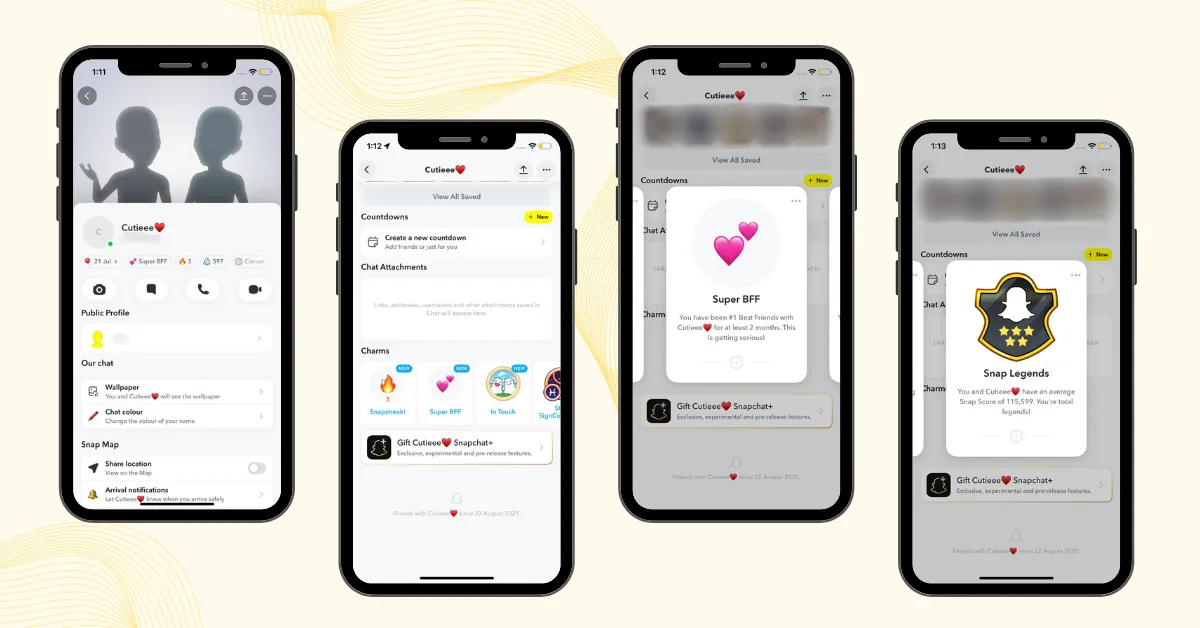
The two pink hearts emoji represent your Super BFF. It means you and your friend have been each other’s #1 Best Friends for two consecutive months, showing the strongest digital bond.
❤️ BFF
If you and your friend stay each other’s #1 Best Friend for two weeks in a row, your friend earns the BFF status, represented by the red heart emoji, highlighting your strongest and growing connection.
💛 Besties
The yellow heart emoji on Snapchat represents your Bestie. It appears when you and your friend are each other’s #1 Best Friend, meaning you both send more Snaps to each other than to anyone else.
😊 BFs
A smiley face emoji represents your Best Friend with whom you send a lot of snaps, but this close friend is not your #1 Best Friend. If you’re an active Snapchat user, you’ll likely see this smiley emoji beside several contacts in your Snapchat friends list.
😬 Mutual Besties
A grimacing face emoji indicates Mutual Besties, meaning you both have the same #1 best friend. In simple words, you share your top best friend, which often happens in close-knit friend groups where strong interactions overlap.
😎 Mutual BFs
A sunglasses face emoji appears when you and another user share the same Best Friend. This emoji is most common in close friend groups with shared interests, such as classmates, teammates, or work buddies.
😏One Sided BFs
The smirk emoji has been deleted by Snapchat due to conflicts between friends, as it appeared when you were the best friend of that friend, but they were no longer yours.
🔥 Streak
When you see a fire emoji next to someone’s name, it means you’ve started a Snapstreak together. A streak starts once you both send snaps to each other for 3 days in a row. The number next to the fire keeps increasing as long as you continue snapping daily.
⌛️ Streak is ending
On Snapchat, the hourglass emoji warns that your Snapstreak is about to end. To protect your streak, you must send at least one snap within 24 hours. Remember, regular chat messages or group snaps do not count toward maintaining a Snapstreak, so only direct snaps to friends will keep it going.
🎂 Birthday
The cake emoji pops up next to a friend’s name on the date they set for their birthday, with a handy reminder to wish them. Snapchat users can choose to show or hide their birthdays in their settings.
👶Baby Face Emoji
The Baby Face emoji on Snapchat appears beside a newly added friend and later changes to another emoji that represents your ongoing interactions and friendship status.
💯100 Emoji
The Hundred emoji on Snapchat appears beside the Fire emoji when you and a friend keep a Snapstreak for 100 days in a row. Many users screenshot this milestone and post it on their Story as a trend to celebrate their consistent streak.
✨Sparkle Emoji
On Snapchat, the sparkle emoji indicates that you and that friend are in the same group chat. It’s a quick visual cue that you’re in a shared conversation with multiple friends, not a private one-on-one chat.
✌️Peace Sign
The peace sign emoji on Snapchat appears next to your favorite group, showing that you actively participated with its members.
🌟Gold Star
The gold star emoji next to your friend’s name on Snapchat means that someone other than you has replayed their Snap within the past 24 hours. It simply shows that the Snap was interesting enough to watch again.
🌙 Moon Emoji
This emoji shows up next to your friend’s name when they’ve activated Night Mode or Do Not Disturb on Snapchat.
📌Pushpin
The pushpin emoji on Snapchat means you’ve pinned a conversation to the top of your chat screen for quick access.
👀 Snapchat Eyes Emoji
This is a Snapchat Plus emoji that can appear in two ways.
✪ Black star Emoji
On Snapchat, this emoji indicates that a user is a Snapchat Plus subscriber, signifying access to exclusive premium features like Snapchat planets.
How to Customize Your Snapchat Friend Emoji
If you don’t like Snapchat’s default friend emojis, you can easily customize them to match your personal preferences by following the steps below:
Customize emoji on Android
Customize emoji on iOS
You can also customize Friend Emojis from the Chat screen on Android or iOS. Just tap the three dots in the top-right corner and choose “Customize Best Friend Emojis.”
Note: If you’re not satisfied with your Snapchat emoji customization, simply tap “Reset to Default” at the bottom of the Friend Emojis screen.
Snapchat’s Evolution: From Best Friends List to Friend Emojis
Snapchat’s Best Friends List was once a public feature that allowed everyone to see each other’s top friends. However, due to privacy concerns, Snapchat replaced it with Friend Emojis, which show your friendship status through hidden emoji meanings.
Note: The Best Friends List still exists, but is now private; only you can see your own list on Snapchat.
Snapchat Emojis for Verified Accounts
Snap stars are the official creators on Snapchat, including celebrities, influencers, and popular personalities, verified by their social presence and high-quality content. Their profiles feature a golden star emoji, making them easy to identify.
Note: Previously, Snapchat assigned unique emojis (balloons, keys, cherries, etc.) to verified accounts to make them easier to recognize, but the golden star emoji has now replaced these.
Snapchat’s Purple Zodiac Emojis
Snapchat offers a fun way for its users, interested in astrology. On your profile, a purple box with your zodiac emoji highlights your birth month, adding a personal touch. Here’s a quick breakdown of all the zodiac signs on Snapchat:
♈ Aries (March 21 – April 20)
♉ Taurus (April 21 – May 21)
♊ Gemini (May 22 – June 21)
♋ Cancer (June 22 – July 22)
♌ Leo (July 23 – August 22)
♍ Virgo (August 23 – September 23)
♎ Libra (September 24 – October 23)
♏ Scorpius (October 24 – November 22)
♐ Sagittarius (November 23 – December 21)
♑ Capricorn (December 22 – January 20)
♒ Aquarius (January 21 – February 19)
♓ Pisces (February 20 – March 20)
Fun Fact: Tap on your Astrological profile to learn more about your star sign and personality.
Snapchat Icon Meanings
Snapchat uses special icons that give extra information about your snaps. These are different from emojis, and their meanings are explained below:
Meanings of Sent Snapchat Icons
Sent a Snap without audio

Sent a Snap with audio

Sent a chat

Sent a snap to the unknown person

Meanings of Opened Snapchat Icons
A friend opened a Snap without audio

A friend opened a Snap with audio

A friend opened a Chat

A friend viewed and received Cash

Meanings of Received Snapchat Icons
You have received a snap without audio

You have received a snap with audio

You have received a chat

Meanings of Viewed Snapchat Icons
Your Snap sent without audio has been viewed

Your Snap sent with audio has been viewed

Your chat has been viewed

Screenshot Icons
A screenshot has been taken of your Snap without audio

A screenshot has been taken of your Snap with audio

A screenshot has been taken of your chat

Replay Icons
Your Snap sent without audio has been replayed

Your Snap sent with audio has been replayed

Post View Emoji on Snapchat
Snapchat+ users can select a custom Post View Emoji that appears next to their name in chat whenever a friend views a snap they’ve sent.
How to set Post view emoji:
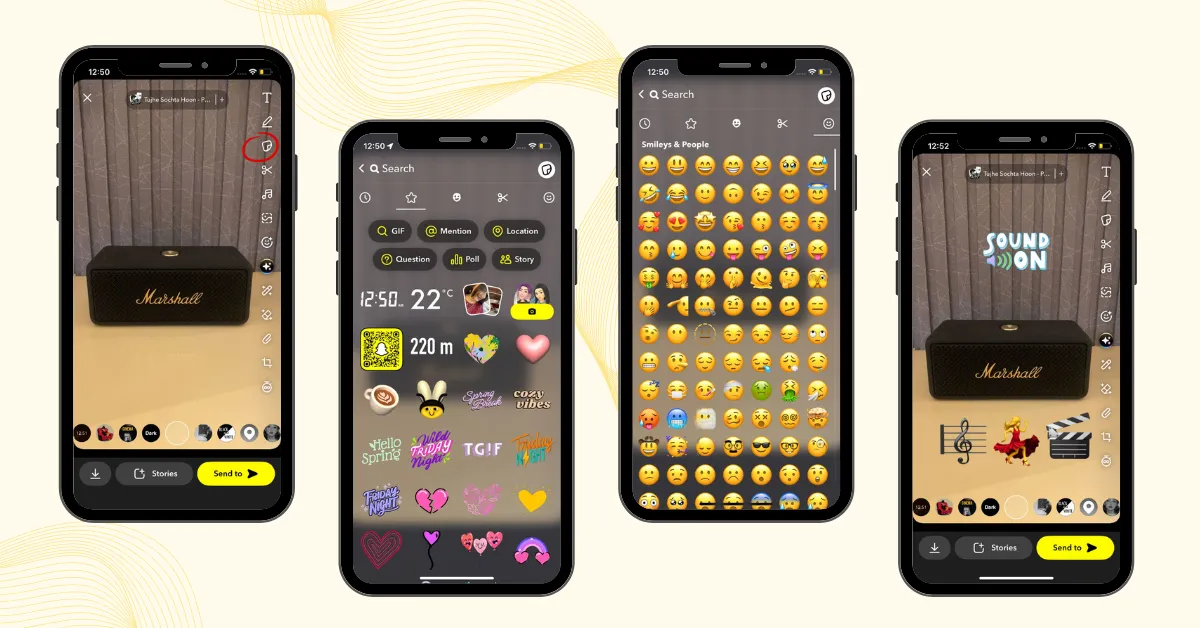
How to Add Emojis to Your Snapchat Photos and Videos
Snapchat photos and videos can be more attractive and visually appealing by adding emojis. Follow these simple steps:
The same emojis and stickers can also be used while chatting with friends. With the Snapchat Keyboard, you can quickly find and send emojis, stickers, and Bitmoji without leaving the conversation.
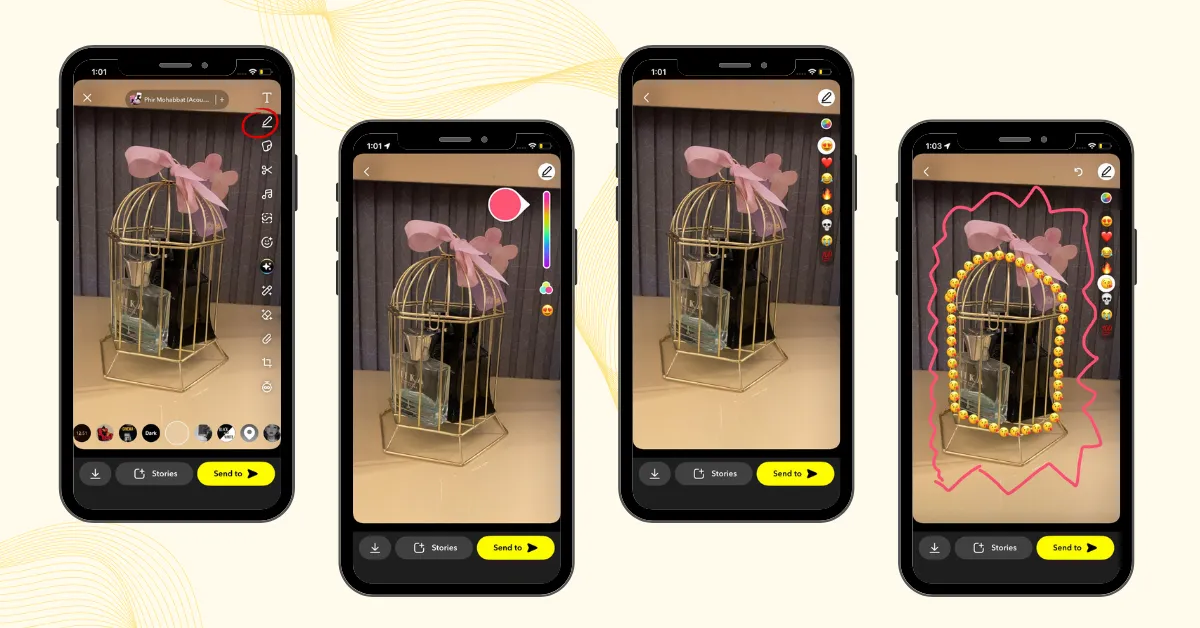
How to draw on Snapchat?
You can easily draw with the pencil tool to make your Snapchat experience incredible, or also get creative by drawing with emojis to add fun.
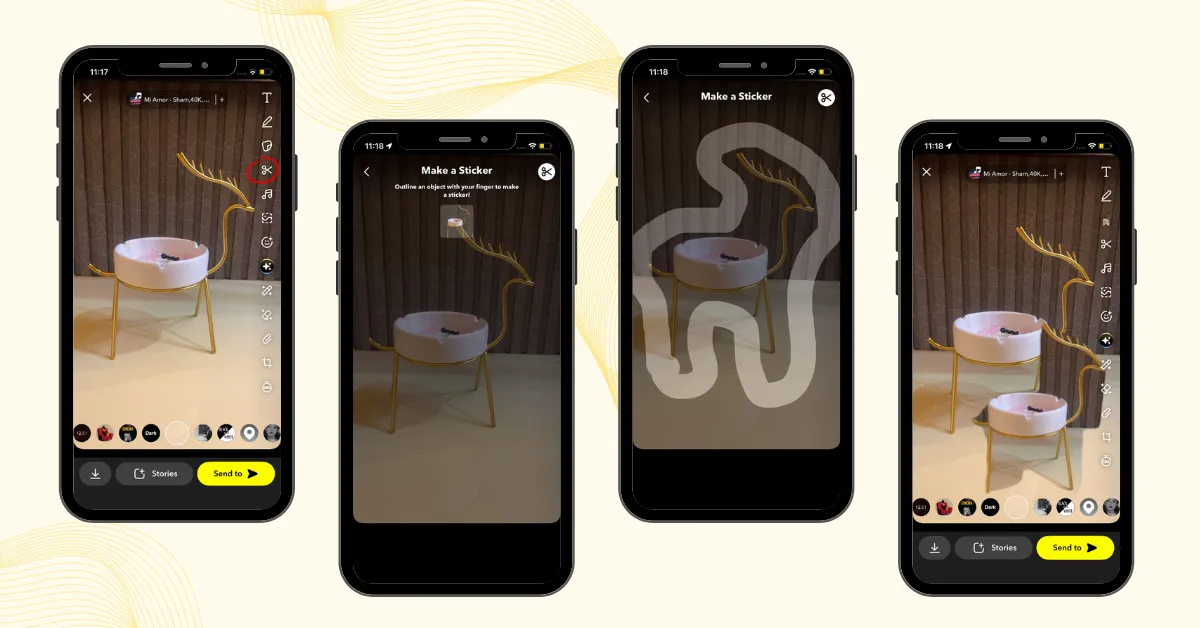
How to make custom stickers on Snapchat?
Snapchat’s Scissors is a tool to create custom stickers for snaps and chats, making them more fun and personalized. Here’s how you can use it:
All your custom stickers are automatically saved in your stickers drawer. You can reuse them anytime or delete stickers you no longer want.
Snapchat Trophies
Snapchat Trophies were a hidden reward system in the app that allowed users to unlock digital badges by completing goals such as increasing their snap score, sending a specific number of snaps, or verifying their email.
Each trophy was represented by an emoji, and users could view their earned trophies in the Trophy Case beneath the Snapcode on their profile. In 2019, Snapchat officially replaced these trophies with Snapchat Charms.
Snapchat Charms
Snapchat Charms are special cards designed to celebrate your friendships privately. These fun tokens are automatically awarded to two friends who are connected on Snapchat. These Charms appear on your friend’s profile. Your charms update over time, unlocking new surprises for your friendship.
Each charm has a unique meaning that highlights your connection, such as:
How to view Snapchat Charms: