
Snapchat QR Code: How to Find, Scan, and Share Your Snapcode (2026)
Adding friends on Snapchat by typing usernames can be slow and frustrating, especially when usernames are hard to remember. That’s why Snapchat introduced the QR Code, which lets users connect, share profiles, unlock AR lenses, and access content with a simple scan.
However, many users still don’t know where to find their Snapcode. As a result, they often miss out on one of the easiest ways to connect and share content on the platform.
In this guide, you’ll learn everything about Snapchat QR code, from finding and sharing your code to scanning others and understanding its practical uses. Whether you’re a casual user, creator, or business owner, you’ll discover how to make connections faster and get more out of the app.
What Is a Snapchat QR Code?
It is a personalized and scannable code, commonly known as a Snapcode, assigned to every Snapchat profile. Just like a person’s fingerprint, each code is unique and linked to a specific account.
In today’s fast-paced digital world, Snapcodes make it easier to connect with others by allowing users to instantly access profiles, content, lenses, and other Snapchat experiences with a quick scan.
As the name suggests, QR stands for “Quick Response.” Snapchat uses this technology to simplify connections, making it faster and more convenient for users to add friends, share profiles, and access content without manually searching for usernames.
What Does a Snapcode Look Like?
It has a distinctive design that makes it easy to recognize:
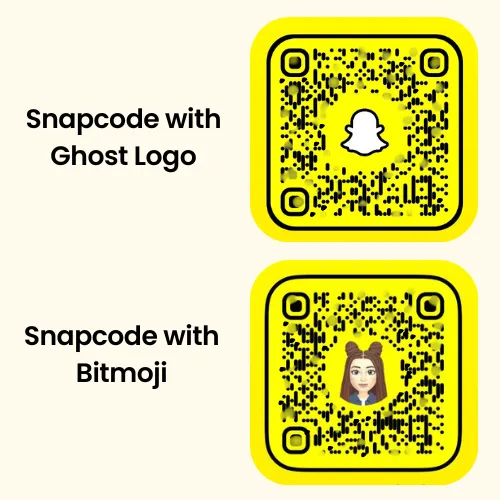
Note: If you see a white Snapchat ghost silhouette in the center instead of a Bitmoji or profile picture, it means the account owner has not created a Bitmoji or uploaded a profile image yet.
How Does a Snapchat QR Code Work?
Snapchat has a built-in QR code scanner that reads the information embedded in a Snapcode and directs users to the linked destination.
For example, scanning a Snapcode may allow you to:
The result depends on what the particular Snapcode is connected to.
How to Scan a Snapcode?
You can scan a Snapcode directly with Snapchat’s camera.
Tip: Keep the entire Snapcode visible on your screen and make sure the image is clear enough for Snapchat to recognize it.
Can You Scan a Saved Snapcode From Your Gallery?
Your saved QR codes in your camera roll can also be scanned by Snapchat. Here’s how it works:
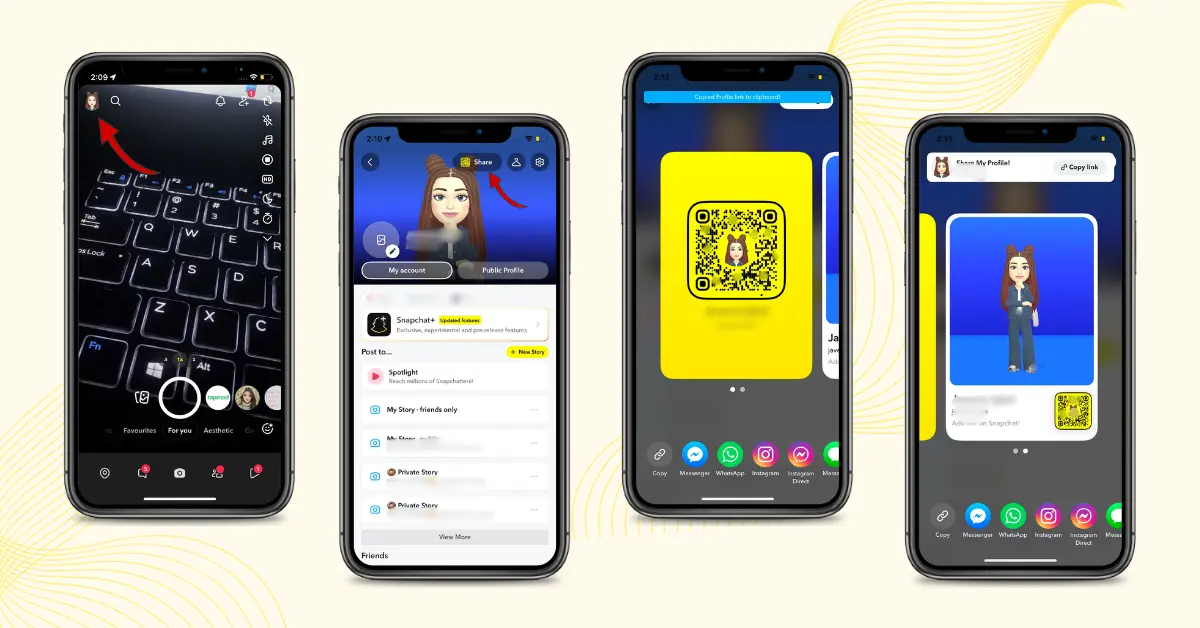
How to Find Your Snapchat QR Code
Finding your Snapcode is quick and easy. Follow the steps below to locate your Snapchat QR Code and start sharing it with others.
Do I need Snapchat Plus to use Snapcodes?
No. Snapcodes are available to all Snapchat users.
You can create, share, and scan them without a paid subscription. When someone sends you a Snapcode, simply scan it to access the profile or content connected to it.
Common Uses of Snapchat QR Codes
Millions of people use Snapchat every day, and Snapcodes make it easier to connect, share, and discover content. From adding friends instantly to promoting brands, Snapchat QR Codes offer several useful features and benefits.
Add Friends Instantly
The most common use of a Snapcode is adding friends. Instead of typing a username, you can scan the code and send a friend request. Once you connect, Snapchat can also show friend rankings based on your interactions.
Share Your Snapchat Profile
You can share your Snapcode whether you have a private or public profile on:
People can scan it and connect with you instantly.
Unlock Lenses and Filters
Many Snapchat creators and brands share Snapcodes that open:
Scanning the code automatically unlocks the experience.
Promote Businesses and Brands
Businesses use Snapcodes to:
Snapchat vs Traditional QR Code
| Snapchat QR Code | Traditional QR Code |
|---|---|
| Primarily works within Snapchat | Works with most QR code scanners |
| Usually links to Snapchat profiles, lenses, or content | Can link to websites, files, apps, and other digital content |
| Contains a ghost icon or Bitmoji in the center | Typically uses a standard black-and-white pattern |
| Designed specifically for the Snapchat ecosystem | Designed for universal use across platforms |
FAQs
Conclusion:
Snapchat’s QR code is a simple way to connect without manually searching for usernames. A quick scan can open a profile, unlock a Lens, or take you to other Snapchat content, while your own Snapcode can be shared almost anywhere.
Whether you’re adding friends, sharing your profile, or promoting a business, it gives people a simple way to find and connect with you. And because the feature is available to all Snapchat users, you can create, share, and scan these codes without needing a Snapchat+ subscription.