
What Does the Lock Mean on Snapchat? Explained (2026)
Most of us use Snapchat every day without thinking about the icons we see. Then, while checking Stories, you notice a little lock icon on one of them. You watch the Story as usual, but a question pops into your mind: Why is there a lock on this Story when the others don’t have one?
Your first thought might be, “Have I been blocked?” or “Why can I only see the lock on this Story?” The answer is much simpler than you might think. The lock icon shows that you’re viewing a Private Story, and you’ve been chosen to see it.
In this guide, you’ll learn what the lock means on Snapchat, why it appears on some Stories, how it works, and how to create your own Private Story, so you’ll never be confused when you see the lock icon again.
What the Lock Symbol Means on Snapchat
The lock icon on a Snapchat Story indicates that it has restricted visibility. Instead of being shared with everyone on the creator’s friends list, it’s only available to a limited audience. In simple terms, the small padlock icon is a sign of a Private Story and lets you know you’re one of the selected viewers who can access it.
What Is a Private Story?
It is just like a regular Story, but instead of being shared with all your friends, it’s only visible to the people you choose. This gives you more control over your privacy and lets you decide exactly who can see your Stories.
💡 Fun Fact: You aren’t limited to just one Private Story. Snapchat lets you create multiple Stories at the same time, each with its own viewer list. For example, you can have one for your family, another for your close friends, whom you can easily find through the Planets system if you have Snapchat+, one for your coworkers, and even for your cousins.
How to Create a Private Story on Snapchat
You can create it in a few steps and choose exactly whom can see it.
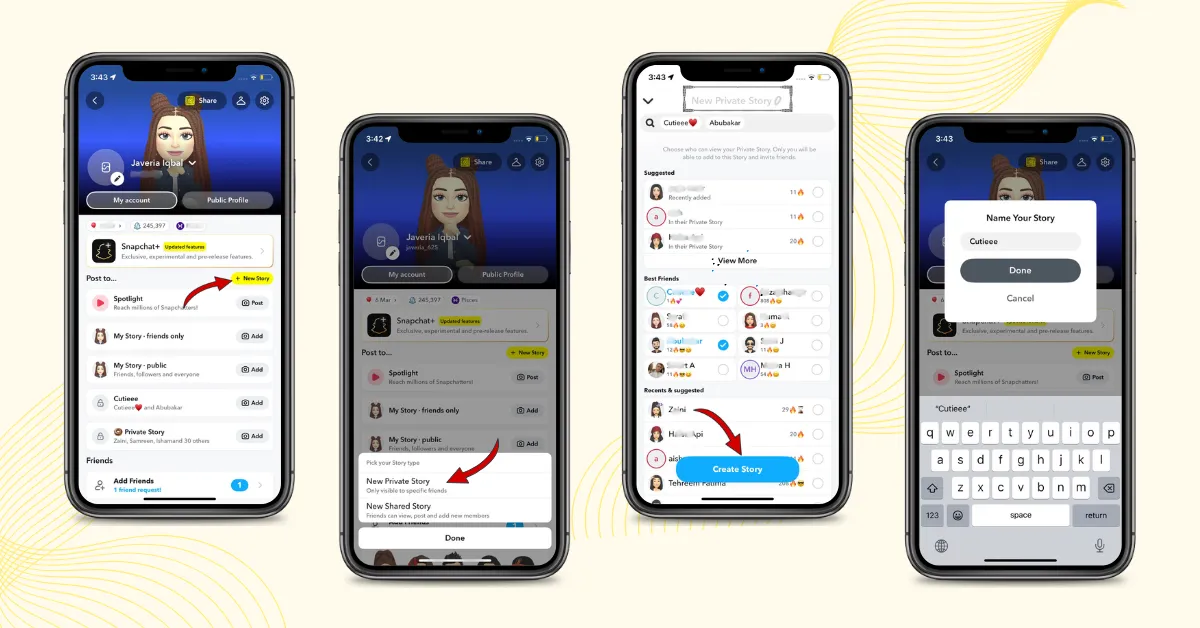
Note: The name of your Story and the number of people on its viewer list are only visible to you. Other members can view the Story, but they can’t see who else is included.
How to Edit and Manage a Private Story
Your Story isn’t permanent once you create it. You can manage its name, audience, and content settings later if your sharing needs change.
To manage it, go to your Snapchat profile, press and hold the Story you want to edit. From the available settings, you can update the viewer list, add or remove friends, rename the Story, or delete it when you no longer need it.
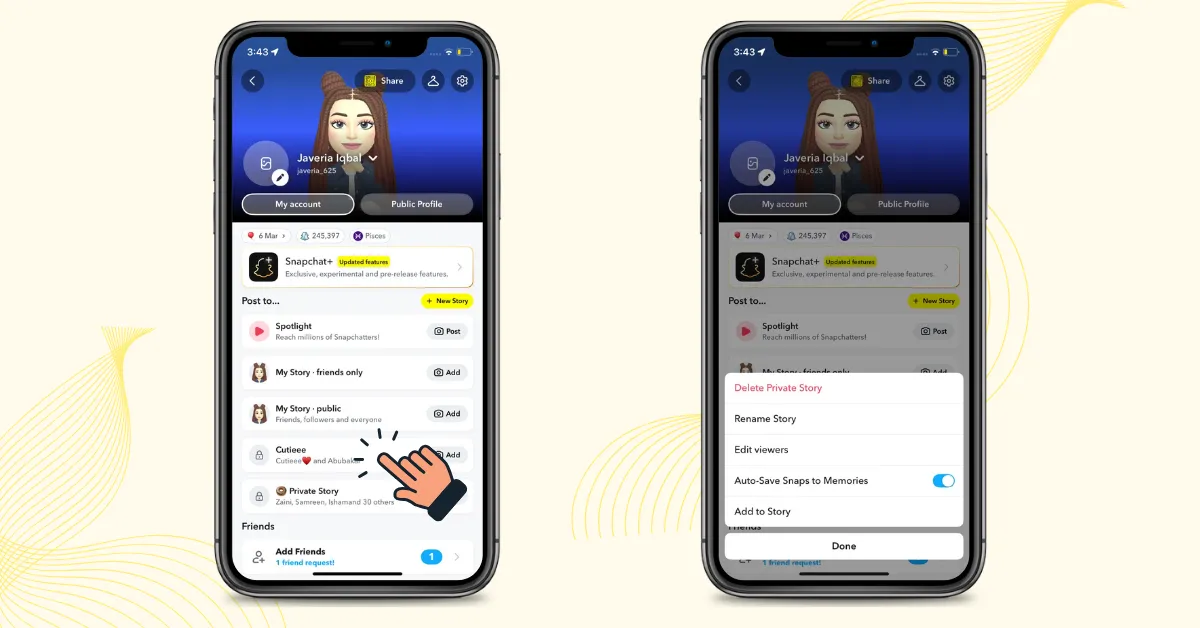
Good to know: Removing someone from your Private Story stops them from seeing future Snaps you post there. Snapchat doesn’t notify them when you remove them, so you can update your audience quietly without sending them a separate alert.
Snapchat Story Types: Private vs Regular vs Public
The main difference is who can view your Story and how much control you have over the audience.
| Feature | Regular Story | Private Story | Public Story |
|---|---|---|---|
| Audience | All your friends | Only friends you select | Anyone on Snapchat |
| Viewer control | Broader audience | Specific friends | Public |
| Lock icon | No 🔒 | 🔒 Lock icon | No 🔒 |
| Best for | Everyday updates | Personal or limited posts | Reaching a wider audience |
| Privacy | Friends-only | Selected friends | Public |
Lock Icon Color Update (2026): Why Is the Lock Blue Instead of Purple?
You may come across older Snapchat guides that describe the lock as purple. However, our testing in 2026 showed something different. We checked Snapchat on multiple Android and iOS devices and consistently found the lock icon appearing blue, not purple.
This doesn’t appear to change what the lock means. The blue lock still identifies a Private Story and indicates that the Story has restricted visibility. Snapchat has not clearly documented when or why this visual color changed, so the purple-to-blue change shouldn’t be treated as an officially announced update.
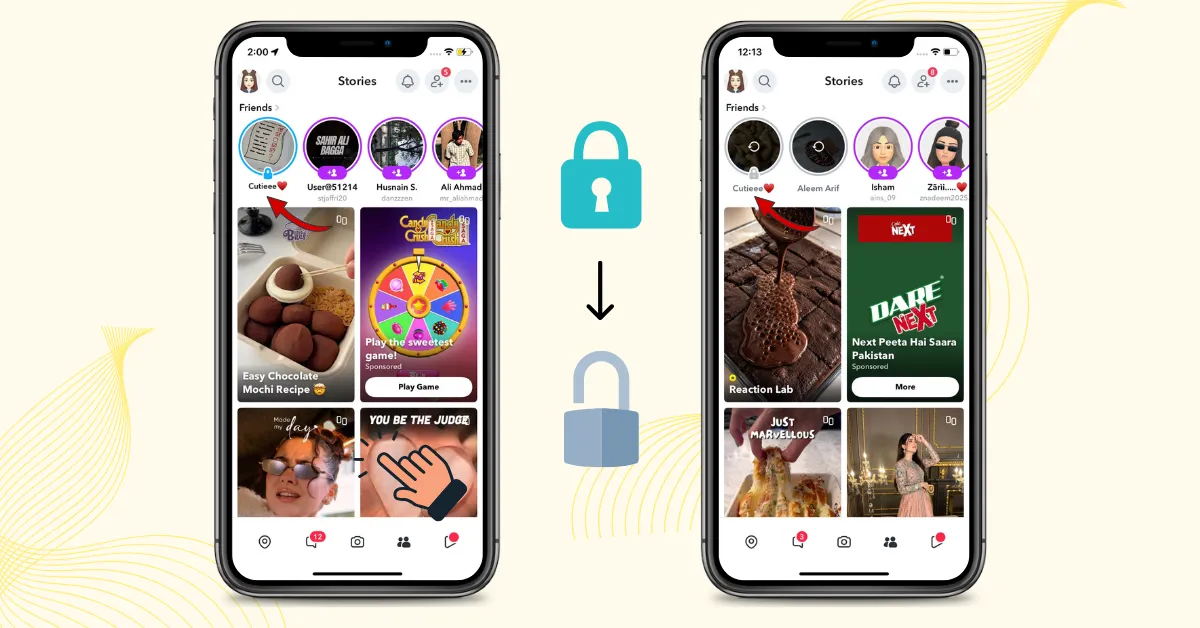
Note: The color may have changed as Snapchat updated its visual design, but the meaning of the lock remains the same.
Blue vs. Gray vs. Purple Lock
| Lock color | What it means |
|---|---|
| Blue | New/unseen Story, you haven’t watched it yet. |
| Gray | Viewed Story, the lock turns gray after you’ve watched the Story. |
| Purple | Indicated an unseen Story on older Snapchat interfaces. |
Why Do People Use Private Stories Instead of Sending Direct Snaps?
Sending Snaps individually takes more time and increases the chance of accidentally missing someone or sending content to the wrong person. That is why people prefer private story as it gives you several perks at once:
Can People Screenshot or Save Your Private Story?
Yes, people can still screenshot or screen record your Story, and Snapchat may notify you with a screenshot icon. So, Private doesn’t mean completely secure; it only limits who can view your content.
If you share sensitive or personal videos thinking that screenshot notifications will keep you safe, think again. Someone could still save or record your content and potentially use it to blackmail or threaten you later. If someone uses your content to blackmail you, it’s important to know what steps you can take to protect yourself.
This is why it’s safest to avoid sharing anything highly sensitive, even on a Private Story. You can’t fully control what someone does after they’ve viewed your content.
FAQs
Conclusion:
The lock on Snapchat means you’re viewing a Private Story. It does not mean you’ve been blocked or that something is wrong with your account. Instead, the creator has chosen a limited group of friends who can view that Story, and you’re one of them.
Whether the lock appears blue or gray, the key meaning is the same: the Story has restricted visibility. Snapchat’s interface can change over time, but the lock remains a simple way to identify a Private Story.